
Choosing a tool
Maya vs Banana Gun for copying Fomo traders
Compare the Fomo-to-wallet setup, copy controls and documented costs of Maya and Banana Gun, including where Maya's standard fee is higher.
Maya starts with a Fomo profile or wallet and offers copy rules plus a separate Paper mode. Banana Gun has wallet copying within a larger Telegram and web trading suite. Compare the chain and controls you need, then check the quote. In the Solana example below, Maya's standard service fee is higher.
Compare a complete Fomo-copy workflow
Start with the person you want to follow. Find the right wallet, choose its network, set a budget and decide how you'll sell. A Fomo follow or alert still leaves you to act; automatic copying requires permission to place orders. Maya and Banana Gun are separate from the Fomo app.
Sources were checked on 18 October 2026: Maya's documentation and interface, and Banana Gun's published pages. This article doesn't compare measured speed, security or returns.
Profile discovery versus an identified wallet
In Maya, enter a Fomo profile or public wallet, then check the resolved wallets and networks. A profile can include several wallets. Each network needs its own balance even when the EVM address is the same.
Banana Gun's Solana guide uses a target wallet address. Its Fomo comparison explains finding a trader, resolving the wallet and configuring the copy. Once you have the address, check whether the product supports the activity you want to follow.
Controls to check in both products
Use this table to choose what to check in the current interface before funding.
| Decision | Maya | Banana Gun |
|---|---|---|
| Interface | Browser dashboard, Telegram Mini App and chat controls | Telegram bot and Banana Pro web ecosystem |
| Starting target | Fomo profile or public wallet; review selected wallets | Target wallet in the published Solana copy flow |
| Practice | Separate Paper copies and records | Equivalent paper-copy workflow not verified in the reviewed pages |
| Buy controls | Size, repeated-buy count, token budget and entry filters | Published Solana guide describes size modes and spending/market-cap controls |
| Exit controls | Copied sells plus independent stop/profit settings | Published Solana guide describes copied sells and attached exit orders |
| Standard service cost in this example | 2% per executed side before any eligible holding benefit | Solana copy guide states 1% per side; verify the exact quote |
Maya's standard percentage is higher in the Solana example
For an equal hypothetical $100 buy and $100 sale, Maya's standard 2% service fee totals $4. The 1%-per-side rate stated in Banana Gun's Solana copy guide would total $2. Neither figure includes gas, tips, venue charges or slippage, and neither example describes a profitable investment.
Banana Gun's homepage summarizes fees by trading type, while the cited walkthrough discusses Solana copying. Confirm the current copy quote on the selected chain instead of assuming every order uses the homepage's lowest rate.
Maya's verified 10,000,000-MAYA holding benefit can reduce Maya service fees to 0% across supported copy chains when the holding is in the Maya dashboard wallet on Base. External, staked and liquidity holdings do not qualify under the current rules. Buying or holding MAYA introduces separate capital and token-price exposure; it is not a free substitute for comparing the standard cost.
Make the rules understandable before making them automatic
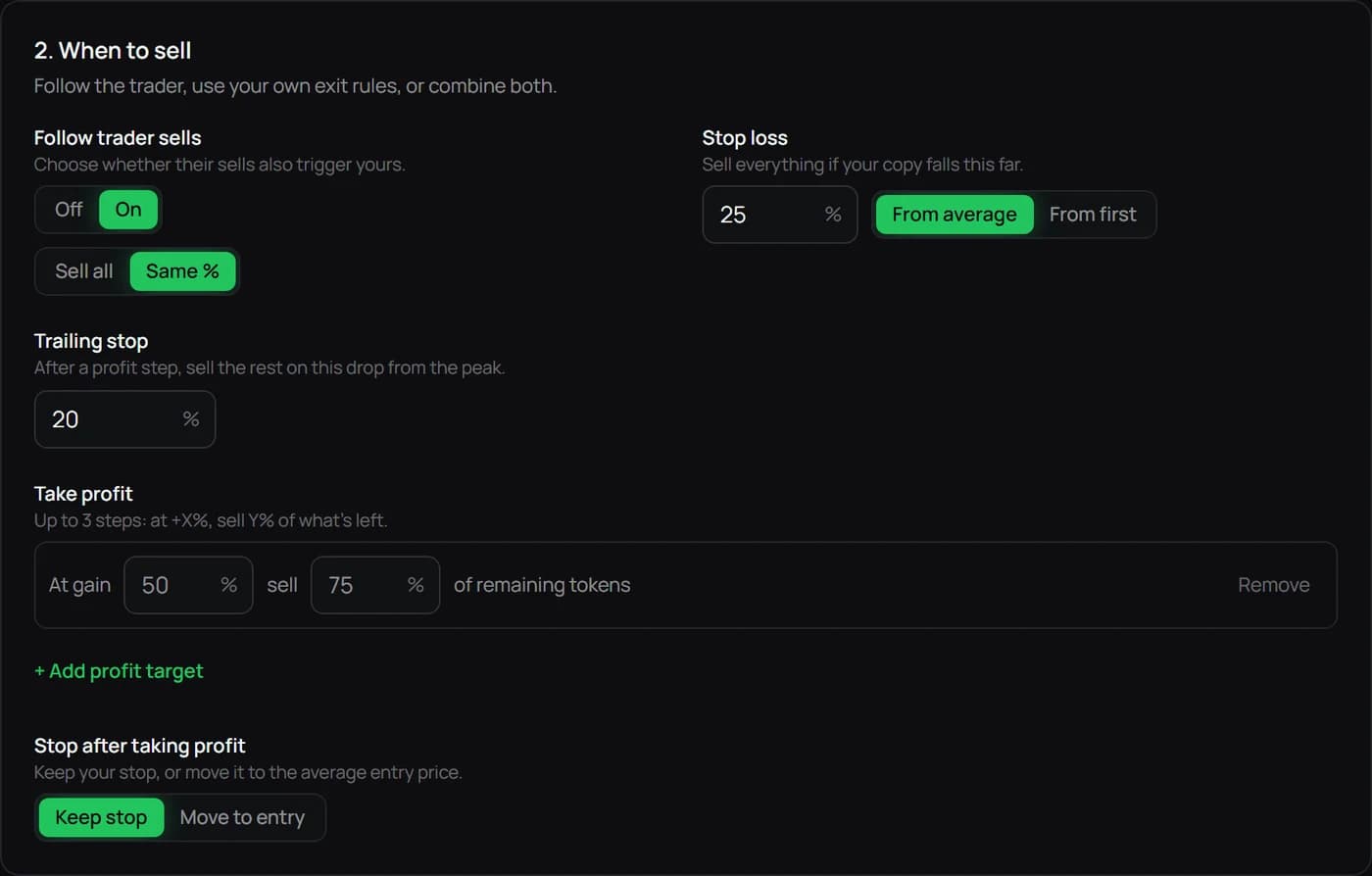
Maya separates the amount per buy, maximum entries and total spend per token. Its exit settings also separate the price-change trigger from the fraction sold. The image shows those controls with example values.
Before making a copy automatic, check what happens on another buy, a partial leader sale or a failed route. You should be able to explain what remains in the wallet and which rule can act next.
When Maya may fit, and when Banana Gun may fit
Maya gives you profile-to-wallet selection, a rules editor and separate Paper records. Use the detailed setup guide to see whether that process suits you, then compare its fee conditions.
Banana Gun offers wallet copying alongside a broader manual-trading suite. If you need those other tools, review them separately from the copying settings.
In either product, check the chain, trading permission, withdrawal and revocation steps. Read what pausing does to the tokens you already hold. Published chain support alone doesn't establish that both tools can execute the same token route.
Questions this comparison cannot answer for you
We haven't tested both products copying the same wallet under the same conditions, so this article can't settle a speed comparison. A leader's past return also leaves out the follower's timing, costs and skipped trades.
Use the documentation and Paper mode where available to understand the controls. Review the separate Live confirmation before allowing real orders. A permission screen and a stop-loss setting don't remove trading risk.
Keep your next step clear.
Review the wallet, network and copy rules before starting.
Open Maya dashboard →Read the full guide →