
Copy trading
Fomo copy trading: setup, rules and what gets copied
Learn how Fomo following differs from automatic copying, then review Maya's wallets, buy limits, exits, paper mode and fees before starting.
To copy a Fomo trader automatically with Maya, choose their wallets and networks, set your buy size and exits, and review funding and permission before you start. Fomo's own feed helps you follow trades and decide what to do. A new Maya copy waits for eligible new trades; it doesn't buy the trader's existing portfolio.
Following a trader and automatically copying are different
Fomo's own guide describes following a trader and choosing whether to buy. An alert tells you about a trade. Check your own order record to see whether you bought anything. Maya is a separate product and isn't operated or endorsed by Fomo.
Check what the service will do before you connect it. Some tools send alerts. Others ask you to place each order or submit orders under permission you've already granted. A tool with that permission can keep trading after you close the interface.
Choose the wallets and networks you intend to follow
Start with a Fomo profile link or a public wallet address. A profile can contain several wallets. Choose which ones to follow and which networks to use. The same EVM address on two networks has separate balances.
Read recent trades and completed exits before choosing. A large open gain or follower count tells you little about what a later copier will earn. Also check how often the trader buys: frequent entries can use up your budget even when each buy is small.
Set a buy size and a limit for repeated entries
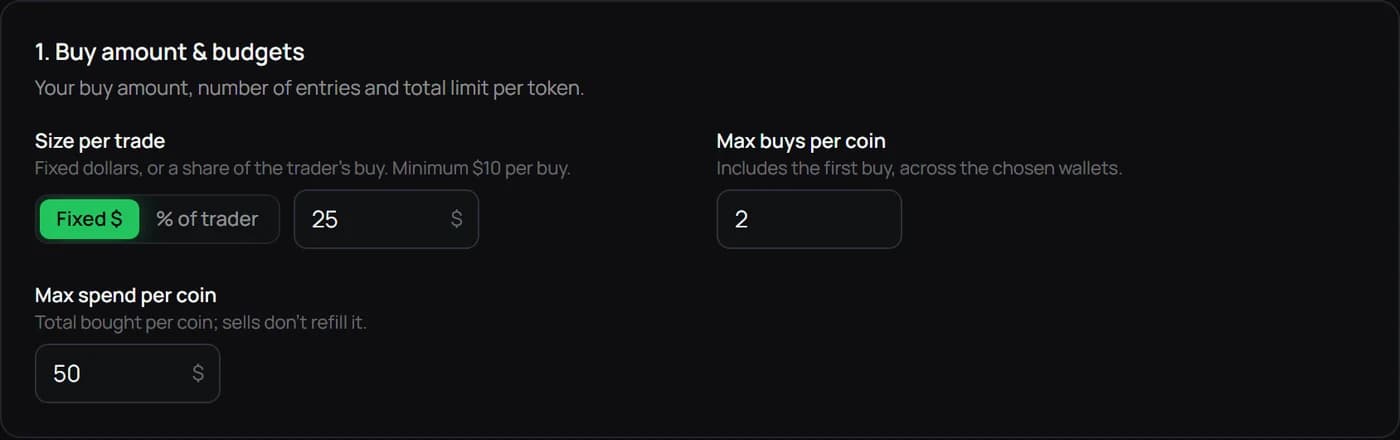
Maya's buy controls separate the amount of each entry, maximum buys per coin and total spend per coin. A $25 fixed buy, two permitted entries and a $50 token budget illustrate three different limits. They do not limit total account exposure if several tokens or traders are active.
In that example, two entries use $50 of trade value before costs. At the standard 2% Maya service rate, those buys add $1 in service fees. Selling later adds another service fee based on the sale value. Gas, venue costs and slippage remain separate. The current minimum copied buy is $10; the example is arithmetic, not a suggested allocation.
Decide the exit before a new buy can happen
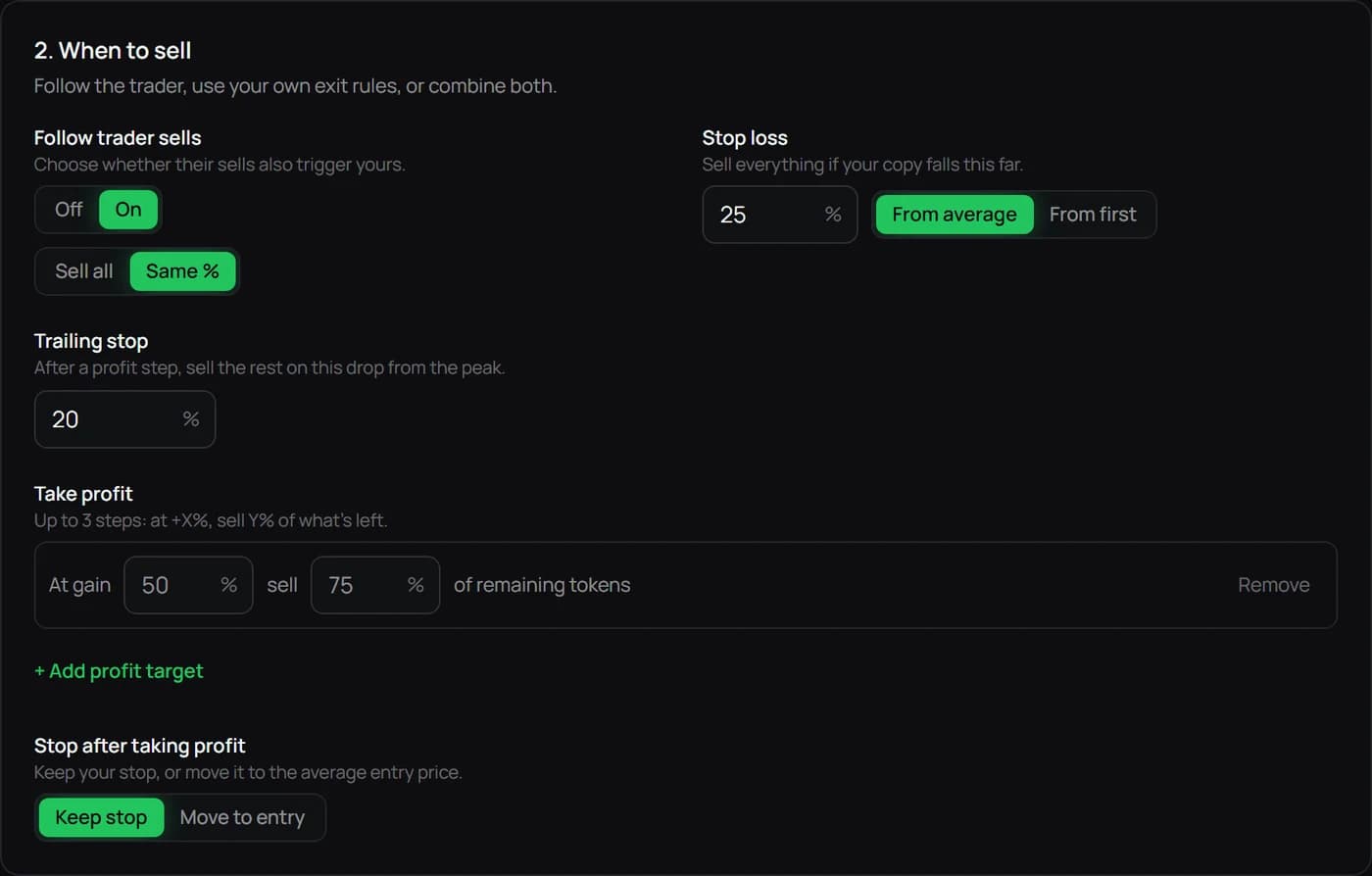
Check whether leader sells trigger your exits and whether they sell the whole position or the same proportion. Your own take-profit, stop and trailing settings can produce an exit before the leader sells. Read the rule summary instead of assuming a preset name answers every question.
A +50% take-profit trigger that sells 75% describes two choices: when the instruction becomes eligible, and how much of the remaining tokens to sell. It leaves 25% open. A stop is an instruction to attempt an exit, not a guaranteed fill price. Liquidity, sudden moves, gas or an unavailable route can worsen the result.
Check Paper or Live, then funding and permissions
Paper mode lets you learn the controls without moving real funds. Keep its limits in mind: a simulated fill doesn't show what a live order would get after liquidity, delays and execution costs. Paper and Live have separate records, and paper activity doesn't create payable rewards.
For Live, each selected network needs its supported trading cash and native gas. Base and Solana have separate balances. Robinhood Chain uses USDG for trading cash. Complete the secure permission step for the wallet you intend to use.
You can save a copy while a selected network is unfunded. That network will skip trades until it's ready, and funding it later won't replay the missed entries. Check the mode, networks, balances and rules on the final review screen.
Verify an eligible signal, then a complete trade cycle
After starting, wait for a new signal and open Terminal. Read Result and Reason together. A buy can be skipped because of an entry-price limit, an old signal, a spent budget, insufficient gas or an unavailable route.
For a filled buy, check the tokens received and recorded cost. After a sale, check how much sold and what remains. Your price, fees and return can differ from the leader's. If an order's outcome is unclear, check its record before submitting it again.
Editing, pausing and changing modes
Editing a copy changes that copy's future behavior. Templates let you reuse rules for another setup. Editing a template leaves existing copies unchanged, and loading one doesn't start trading. Read the rules summary after loading it.
Switching the view to Paper leaves Live positions open. Pausing, selling and revoking permission are separate actions too. Read what the chosen control does to held tokens and protective exits. Closing the app can't undo a transaction already sent.
Keep your next step clear.
Review the wallet, network and copy rules before starting.
Open Maya dashboard →Read the full guide →